Karde · Write · A quiet page built for the long-form work of a novel Begin Your Book
Write Build Publish Pricing Contact
Begin Your Book

Write

Premium

The Brief

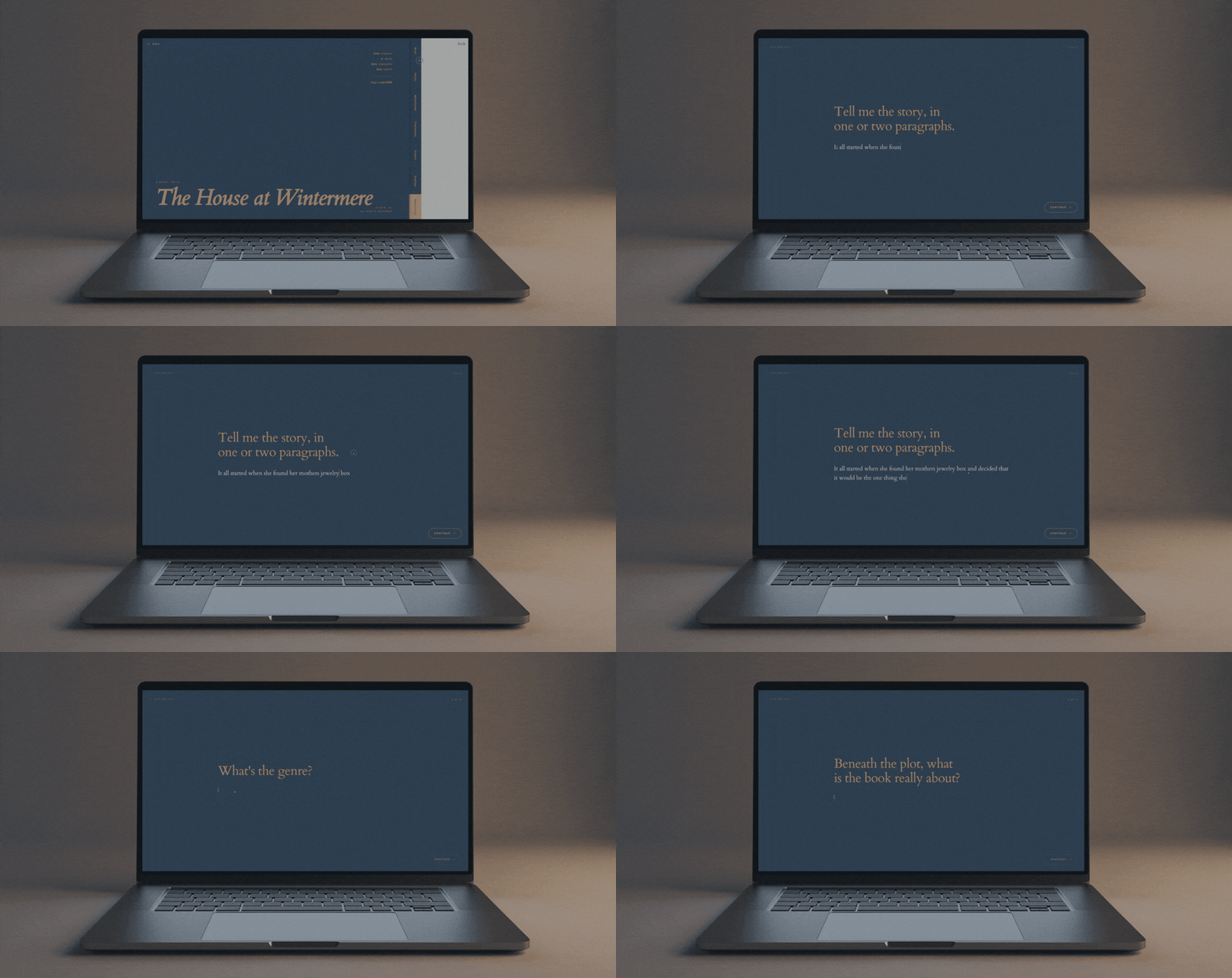
A single considered page that holds the whole shape of your book: the logline, the story, the genre, the themes, the setting, the tone and voice, the audience. Seven prompts, one clean page, ready to pitch and ready to come back to every time the writing loses its thread.

The Brief in Karde

The starting point

The Brief helps you build out the idea of your story.

01

Logline

Your book in a single line. The sentence you can say out loud when someone asks what you are writing, without losing what makes it yours.

02

Story

The shape of the book underneath the logline. Who it is about, what happens to them, what they are trying to do, and what stands in the way.

03

Genre

The shelf your book sits on. Literary, crime, romance, speculative, and every subgenre inside it. Named plainly so an agent knows where it belongs.

04

Themes

The ideas your book is turning over. Grief, ambition, inheritance, forgiveness. The undercurrents a reader will feel long before they can name them.

05

Setting

Where and when the book takes place. The city, the century, the season, the room. The world your reader will step into on page one.

06

Tone & Voice

How the book sounds on the page. Dry, tender, wry, elegiac. The voice a reader hears before they know a single character's name.

07

Audience

Who this book is for. The reader you have in mind while you write, and the shelf beside them where your book will live.

How the Brief works

No. 01

Answer the seven prompts.

Open the Brief and work through them at your own pace. Logline, story, genre, themes, setting, tone and voice, audience. Answer in any order, come back and revise as often as you need.

No. 02

Watch the book come into focus.

Each answer sits in its own field, held together on one page. The shape of your novel becomes something you can read back, refine, and pass to someone else without a paragraph of context first.

No. 03

Keep it beside you as you write.

The Brief lives inside the project folder alongside the manuscript, the characters, the events. One click away every time the writing loses its thread, so the book you set out to write is the book you actually make.

“Pitching my own stories always felt difficult. So much to say, with little space to express it. The Brief feature fixed that.”

Every story I loved was too much to fit in a paragraph, and even years of pitching didn't make it easier. So I built a method for both sides. The writer gets the essence down cleanly. The reader feels real opportunity, not chaos.

· Natassja Lindrea, Founder of Karde

Notes is where everything that is not the manuscript lives.

One place for every note about your book.

Every writer has a mess of notes. Sticky notes on the desk, scraps in a notebook, half-finished thoughts in the notes app on your phone, three different Google Docs, a folder in your inbox, and the back of an envelope from a train ride two years ago.

Notes in Karde brings all of that into one considered space. A freeform writing surface for anything that isn't the manuscript, with a gallery view of every note you've ever taken, a tag on each one, and a filter that surfaces only what you need. Held together with the book itself.

One
Gallery, all your notes
Every
Thought Tagged
Zero
Notes Lost

We've been there

Notes scattered across notebooks, sticky notes, tabs, and the back of your hand.

The line scribbled on a train that would have unlocked chapter twelve. The detail written at midnight and never found again. Karde holds every note about your book in one place, tagged the way a writer thinks. Nothing buried. Nothing lost.

One tag brings every note about a character straight to you.

Filter by scene, by chapter, by theme, or by the character whose voice you're chasing. Notes surface exactly when you need them.

The Notes page

A page built for the way writers actually think.

Every note has a title, a body, and a tag. The editor formats the way any writing surface should, insert an image, insert a link, drop in a quote, add a heading. Every tag rolls up into a filter, and every note you drop into the manuscript stays tied to its source, so you can jump back to the original in one click. Not a document, not a folder tree, not a search bar. A considered writing surface.

And every small feature that keeps the writing flowing

Nothing between you and the next line.

Every keystroke autosaves. Every note carries a tag. Any note can be dropped into the manuscript as an inline note that keeps a link back to where it came from, so you can jump between the note and the scene it belongs to without losing your place. Nothing gets in the way of the writing.

+
Autosave
every keystroke
+
Tag
every note
+
Insert images,
links, quotes
+
Drop into
the manuscript

The Manuscript holds everything a novel needs

A quiet writing environment set like a book, with the Brief, the Characters, the Events and every Note you've ever taken one keystroke away. Everything a writer needs, in one considered place.

Free · Drafting the Manuscript

A page with nothing on it but the writing.

No formatting bar across the top. No notifications, no popups, no reminders. Just cream paper, serif type, and the sentence you are writing. Every tool lives in a quiet rail off to the side until you ask for it, so the flow is never broken and the words are the only thing you see.

Sit inside the writing ›

Set the page the way you write.

Page Setup lets you shape the manuscript to the writer, not the app. Choose the typeface, the type size, the line spacing, the alignment, the margins, the paper colour and the writing background that let you sit inside the work for hours. Set it once, and every session opens exactly the way you left it.

Shape your page ›

Two modes for the two ways a book actually gets written.

Write Mode is for the drafting: a quiet page, formatting stripped away, words flowing forward. Edit Mode is for the revising: the full toolkit at hand, bold, italic, headings, alignment, chapter jumps, search and replace, ready to pull the manuscript apart and put it back together. Switch between them with a keystroke, so each pass gets the interface it needs.

Draft, then revise ›

Every small tool the writing itself needs, one keystroke away.

Dictate for the ideas that arrive faster than you can type. Inline notes for the reminder to yourself in the margin. The Author's Note for the thinking that sits alongside the manuscript. A Chapters panel that jumps you anywhere in the book. A timer for the sitting. A live word count. Search and replace, keyboard shortcuts, autosave on every keystroke, and .docx export when the draft is done.

See the full toolkit ›
I wanted the manuscript, the notes and the plan to be parts of the same book, not three files in three places. That is what Karde is.

· Natassja Lindrea, Founder of Karde

No one holds a whole book in their head.

But every writer needs somewhere considered to hold the work, so nothing you write is ever lost.

Karde is where all of it lives. The manuscript, the characters, the notes, the fragment of dialogue you scribbled on a napkin. One place, so you can stop trying to hold every piece in your head.

Made for novelists

Karde vs. everything else

Built for a book, not a memo.

Most writing tools were built for something else and adapted afterwards. Karde was built for the long, complex work of a novel, and nothing else.

Karde is for you if:

Your project is a novel, not a document
Manuscript, characters, notes and events held together
A page built for long-form fiction
Every tool is one a novelist actually uses

Everyday writing platforms are for you if:

Your project is a memo, report or contract
A hundred features built for offices, not novelists
No character system, no story plan, no notes tied to the book
Comment threads, collaborators and notifications by default

When you are ready.

Begin your book in Karde, and keep every part of it in one place.

↑ Top Sign In